Recovering Lost 3Ds Max File after a Crash
3ds Max Recovery File Location
The issue of restoring a 3ds Max scene sometimes arises when it is accidentally or abruptly closed. During the process of working on any project, there are situations where it becomes necessary to restore a 3ds Max scene, for which backup copies are created in a dedicated folder. If you are using the Windows operating system and have not changed the project location or are unaware of the project's location, you can locate this folder by opening the Customize menu on the main toolbar of the 3ds Max program and selecting the option "Configure Project Paths".
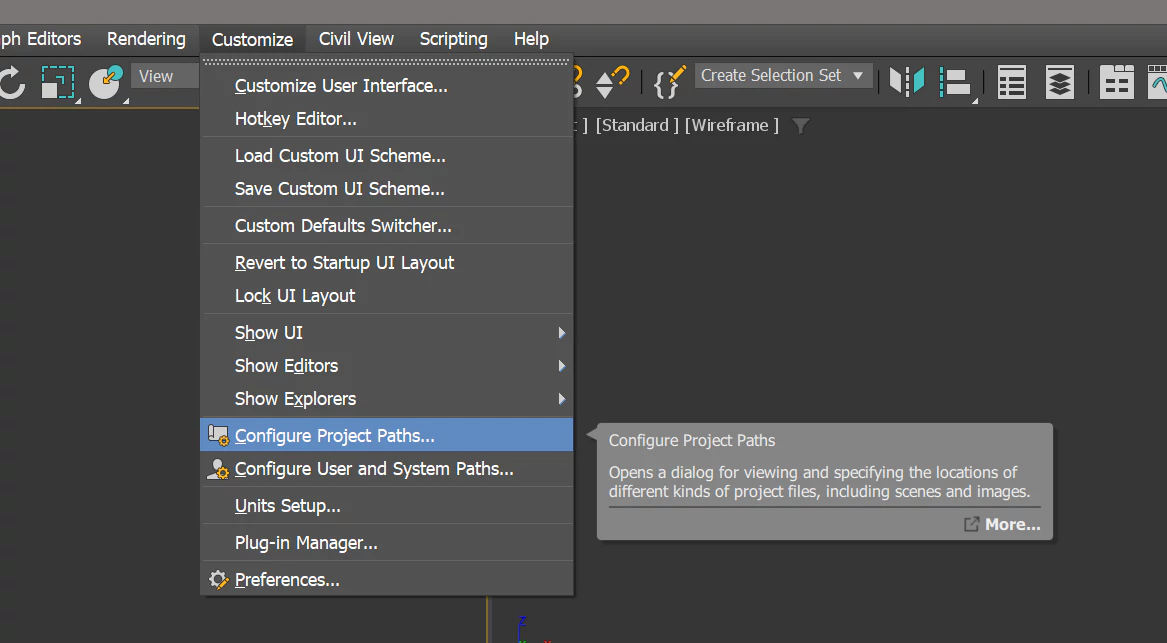
In the opened "Configure Project Paths" window, find and select the line with the name "AutoBackup" and then click the "Make Absolute" button on the right side of the same window.

The full path indicating the location of the Autoback folder with scene backups will appear.

If any failure occurs during your work, you can restore the 3ds Max scene using a backup copy from this folder. There will be three copies in the folder, and you can find the appropriate file based on the modification date.

The number of backup copies can be changed. To do this, select Customize > Preferences from the main menu. In the preferences window, go to the "Files" tab. In the "Auto Backup" section, the "Enable" parameter allows you to activate backup saving, the "Number of Autoback files" parameter sets the number of copies, and the "Backup Interval (minutes)" determines how often copies are created, with a default interval of every 5 minutes.

Latest Discussions
 Tom Schmidt
How I can get orders very quickly?
Thanks for pointing that out, you’re absolutely right. Render Camp and Simple or Difficult are doing great work for the community, and their free content is incredibly valuable. Really appreciate you mentioning them, we’ll definitely add both to the list.
 CGAward Team
You can't leave out Render camp and Simple or Difficult. Those channels are literally the best; giving out free lessons worth thousands of dollars.
This 3D model beautifully captures the iconic Flowerpot VP1 design! Given its historical ties to the Flower Power movement, how do you handle the materials to best replicate that retro aesthetic?


The making of "Nepal School" by Shadowplay Studio

Enhancing 3D Visualizations with Stable Diffusion AI

"New World" Tutorial by uto.vz

Making of "Coming Home" using Blender and Cycles

Making of "The Farmhouse" in D5 Render by Figment Visual

Doing the Interior CloseUp Renders in Vray with Romuald Chaigneau

CGAward ArchViz Tools
Practical tools built for ArchViz professionals.
Explore
How I can get orders very quickly?
Thanks for pointing that out, you’re absolutely right. Render Camp and Simple or Difficult are doing great work for the community, and their free content is incredibly valuable. Really appreciate you mentioning them, we’ll definitely add both to the list.
You can't leave out Render camp and Simple or Difficult. Those channels are literally the best; giving out free lessons worth thousands of dollars.
This 3D model beautifully captures the iconic Flowerpot VP1 design! Given its historical ties to the Flower Power movement, how do you handle the materials to best replicate that retro aesthetic?
❤️thanks!!